Streamline Transactions with a QR Code Sign Template
In the modern retail and service environment, speed is currency. Customers expect a frictionless experience, whether they are grabbing a morning coffee or buying a handmade candle at a local market. For small business owners, the challenge lies in facilitating these transactions without needing expensive, proprietary hardware. This is where the utility of a QR Code Sign Template for Small Business becomes evident. It is not merely a piece of paper; it is a bridge between your physical location and your digital wallet. By utilizing tools like editable Canva templates, you can transform a simple scan into a completed sale in seconds.
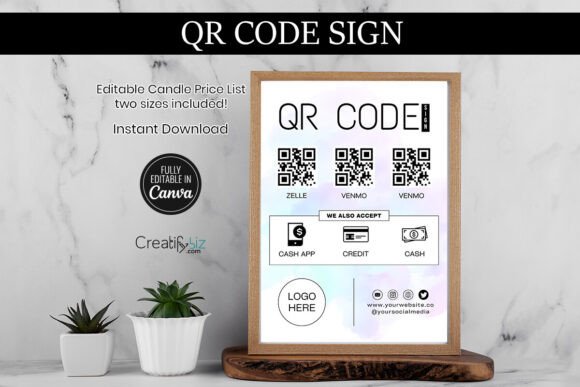
The core appeal of these templates lies in their visual adaptability. Often designed with a "modern typography" aesthetic, they prioritize clarity. You won't find cluttered backgrounds or illegible scripts here. Instead, the focus is on white space, high-contrast colors, and bold typography that screams "Scan Here." Whether you are using a sans serif font for a clean, tech-forward look or a serif font for a boutique feel, the template acts as a vessel for your brand identity. It allows you to maintain the personality of your shop—be it rustic, corporate, or eclectic—while serving a purely functional purpose.
Visuals and Brand Identity
When we talk about the "look" of a QR Code Sign Template for Small Business, we are discussing the intersection of form and function. A well-designed template does more than just display a QR code; it reinforces your brand identity. Think of the sign as a micro-billboard. The choice of display font for the header—such as "Scan to Pay" or "Connect With Us"—sets the tone. A rounded, handwritten font might suggest a friendly, artisanal vibe, perfect for a farmer's market stall. Conversely, a sharp, geometric sans serif typeface communicates efficiency and modernity, ideal for a tech repair shop or a trendy cafe.
The visual hierarchy is critical here. The QR code is the focal point, but the surrounding text guides the user. You need to tell them exactly what to do: "Scan to pay with Venmo" or "Follow us on Instagram." The templates usually allow for customization of these elements, meaning you can adjust the kerning and leading to ensure readability. If the sign is placed at a counter, the text needs to be legible from a distance of two to three feet. This practical application of typography ensures that the sign isn't just decorative but is an active part of your operational workflow.
Strategic Applications for Small Business
The versatility of these templates extends far beyond the checkout counter. While their primary function is often a payment sign for services like Venmo, CashApp, or PayPal, their utility spans the entire customer journey. Consider a hair salon: a framed QR code sign at the reception desk can handle payments, but a smaller version on the coffee table can link to the booking website or the stylist's Instagram portfolio. This is where the concept of editorial design meets practical application; you are curating the customer's experience through visual assets.
For those in packaging design or product-based businesses, including a "Connect With Us" card in every shipment is a standard practice. Using a QR Code Sign Template for Small Business ensures that this insert looks consistent with your other marketing materials. It creates a cohesive unboxing experience. Furthermore, these templates are invaluable for pop-up events. Setting up a booth at a trade show requires rapid deployment of brand assets. Having a pre-made, editable template means you can print a professional-looking sign in minutes, ensuring your booth looks established and trustworthy even if you are a new startup.
Practical Implementation and Design Tips
Implementing these templates effectively requires a bit of design strategy. First, consider the material. While digital files are great for social media graphics, physical signs benefit from heavy cardstock or even lamination to withstand daily wear and tear. When customizing your template in Canva, pay attention to the color palette. Ensure there is sufficient contrast between the background and the text. A light gray text on a white background might look sleek on a screen, but it will disappear in a dimly lit restaurant.
Regarding typography, do not be afraid to mix styles, but do so with purpose. A common strategy is to pair a bold display font for the headline with a neutral, highly legible sans serif for the instructions. Avoid using script fonts or overly decorative typefaces for operational text like "Scan Here"—save those for your logo or subheadings. The goal is to minimize friction. If a customer has to squint or decipher a fancy font, you have lost the efficiency battle.
Finally, think about the placement of your QR Code Sign Template for Small Business. It should be at eye level or slightly below, directly in the customer's line of sight when they are ready to pay. Avoid placing it behind glass where glare might obscure the code. By treating this template not just as a printable file but as a piece of commercial design, you elevate your business operations. It signals to your customers that you value their time and have invested in a streamlined, professional environment. Whether you are a freelancer, a retailer, or a service provider, this simple digital asset is a powerful tool for modern commerce.