Clean & Stylish: The Minimalistic Cookie Order Form Template
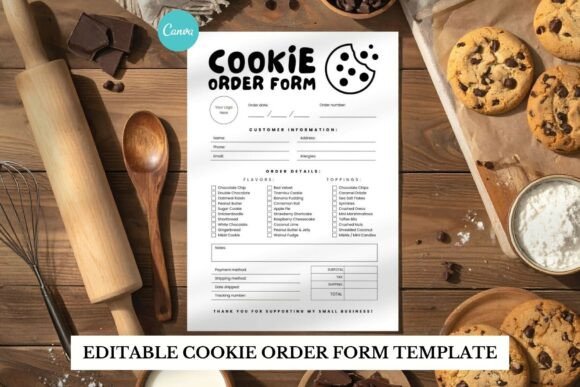
In the world of home baking and small-batch treats, the details matter just as much as the flavor. You’ve perfected your recipe, styled your packaging, and built a social media presence that gets mouths watering. But there’s one piece of the puzzle that often gets overlooked: the order form. A cluttered, hard-to-read form can create confusion and undermine the professional image you’ve worked so hard to build. This is where a thoughtfully designed tool, like the Cookie Order Form Minimalistic template, becomes indispensable. It’s not just a piece of paper; it’s a reflection of your brand’s commitment to clarity and quality.
The Power of a Monochrome Aesthetic
The visual language of this Canva template is intentionally restrained and powerful. By embracing a black and white palette, it achieves a timeless elegance that never feels dated. This isn’t about being plain; it’s about being purposeful. The minimalistic style strips away unnecessary ornamentation, focusing the customer’s attention squarely on the information that matters: their order details, your business name, and the terms of service. This approach aligns perfectly with modern typography principles where space, alignment, and font choice do the heavy lifting. The result is a document that feels both professional and approachable, conveying trust and meticulous attention to detail before a single cookie is even baked.
This design philosophy has a direct impact on your brand identity. A monochrome, minimalistic form communicates sophistication and confidence. It suggests that your business values substance over flash, quality over gimmicks. For customers, this builds subconscious trust. They perceive you as organized, reliable, and focused on delivering a premium product. This template acts as a consistent design asset, ensuring that every customer touchpoint—from the first inquiry to the final invoice—feels cohesive and intentional.
Where This Template Truly Shines
The versatility of the Cookie Order Form Minimalistic template is one of its greatest strengths. Its clean foundation makes it adaptable to a wide range of applications within and beyond the bakery world.
- Direct Customer Use: The primary function is for taking orders. Its clear layout prevents errors in quantities, flavors, and personalization requests, streamlining your workflow and reducing back-and-forth communication.
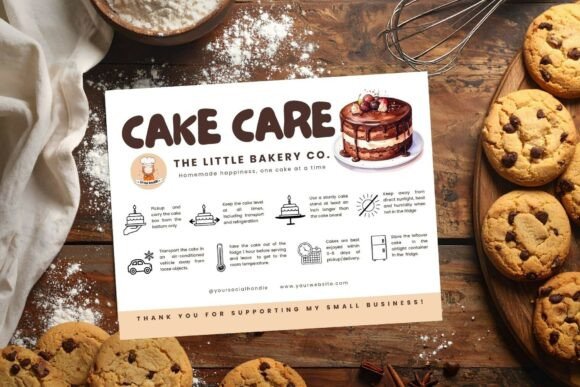
- Packaging Inserts: Printed on quality cardstock, this form transforms into a sophisticated packing slip or care card. It can include ingredient lists, storage instructions, or a thank-you note, elevating the unboxing experience.
- Digital Branding: Beyond print, the template is perfect for creating digital assets. Export it as a PDF for email correspondence, or use it as a base for creating social media graphics that announce order openings or showcase your professional process.
- Beyond Baking: The minimalistic structure is ideal for any small business requiring a simple, elegant order form. Think custom gift boxes, handmade candles, floral arrangements, or even freelance service quotes. Its neutrality is its superpower.
Making It Your Own: Practical Customization in Canva
The true value of this template is unlocked through its customization. Being fully editable in Canva (with both Free and Pro accounts) means you are in complete control. Here’s how to approach it strategically:
Evaluating and Editing for Your Brand: Start by considering your existing brand assets. Do you have a specific logo? A set of brand colors? While the template is black and white, you can easily introduce a single accent color from your palette to headings or borders. Swap the included fonts for ones that match your brand identity—perhaps a clean sans serif font for body text and a complementary script font or serif font for your business name to add a touch of personality. This process of font pairing is where you can inject subtle flair while maintaining the form’s clean readability.
Functionality First: As you customize, always prioritize clarity. Ensure there is ample space for customers to write or type. Check that the visual hierarchy guides the eye naturally from the business header to the item list, and finally to the totals and contact information. A well-executed minimalistic design is one where the user never has to search for the next step.
Testing and Finalizing: Before you send your first form, test it. Print a copy to see how it feels in hand and how the ink sits on the paper. Send a digital PDF to a friend to fill out on their computer or phone. Is the spacing comfortable? Is all the information clear? This real-world testing is a crucial step that separates good design from great, user-centered design.
Ultimately, adopting a tool like the Cookie Order Form Minimalistic template is a small investment with a significant return. It saves you hours of design time, ensures consistency, and presents your business with the polished professionalism that today’s customers expect. It allows you to focus on what you love—creating delicious treats—while the paperwork handles itself with quiet, elegant efficiency.