Organize Your Shared Space: A Designer's Take on This Canva Template
Living with a partner, roommate, or sibling requires a delicate balance of communication and structure. While whiteboards are functional, they often lack aesthetic appeal, and sticky notes inevitably get lost. This is where the Chore Chart Canva Template 3 steps in, bridging the gap between household management and modern design. It isn't just a list; it is a visual system designed to encourage accountability without the nagging. For anyone who values both order and design, this editable template offers a sophisticated solution to the mundane problem of shared duties.
Visual Style and Aesthetic Appeal
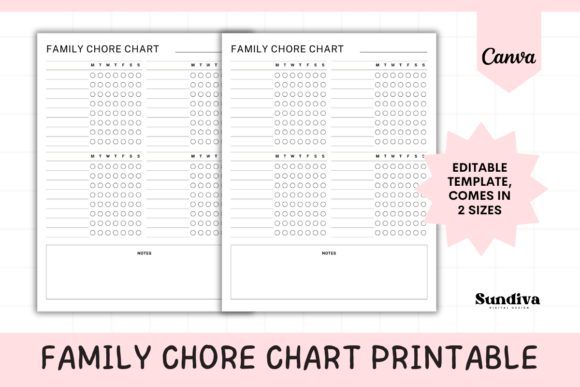
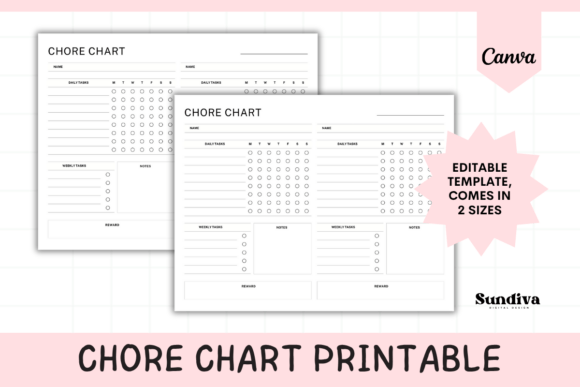
Unlike generic printable charts you might find with a quick search, this template embraces a clean, contemporary aesthetic. The layout is structured to handle two distinct sets of responsibilities, making it perfect for couples or roommates. Visually, it balances whitespace with functional elements, ensuring that the chart doesn't overwhelm the wall or refrigerator it occupies. The use of side-by-side columns allows for immediate visual comparison, fostering a sense of friendly competition or mutual support.
The design relies on strong visual hierarchy. The headers for "Daily Tasks" and "Weekly Tasks" are distinct, guiding the eye naturally from high-frequency chores to less frequent maintenance. The inclusion of a "Reward Box" is a clever design touch; it transforms the chart from a list of obligations into a goal-oriented system. From a graphic design perspective, the template utilizes a harmonious color palette and clear typography that feels professional yet approachable. It avoids the "childish" look often associated with chore charts, making it suitable for adult living spaces.
The Power of Editable Design Assets
The true value of the Chore Chart Canva Template 3 lies in its adaptability. Delivered via a PDF link, the design opens directly in Canva, a tool accessible to everyone from professional designers to casual hobbyists. This is not a static image; it is a fully functional design asset. You have complete control over the color palette, allowing you to match the chart to your kitchen backsplash, office decor, or existing brand identity if you are using it in a shared workspace.
Typography plays a crucial role in the usability of this chart. While the default settings offer a balanced font pairing, Canva allows you to swap these out. You might choose a modern sans serif font for a minimalist, industrial look, or perhaps a friendly handwritten font for a warmer, more personal touch. Because the template is optimized for both US Letter and A4 sizes, the text scales beautifully, ensuring readability whether you print it small for a planner or large for a wall poster.
Practical Applications for Every Household
For the content creator or entrepreneur working from home, the line between workspace and living space often blurs. This template works exceptionally well as a home-office management tool. Imagine using one column for "Business Tasks" and the other for "Home Chores." This application utilizes editorial design principles to organize complex schedules into digestible chunks. The typography remains legible even when filled out, provided you stick to the established margins and sizing.
For small business owners managing a shared studio or workshop, this template serves as an excellent commercial font friendly asset for internal operations. It can be customized to track inventory stocking, cleaning schedules, or opening and closing duties. The ability to edit the text means you are not locked into domestic language; you can adapt the headers to fit specific industry terminology. This flexibility is a hallmark of high-quality digital products.
Design Considerations and Usability
When customizing the Chore Chart Canva Template 3, it is important to consider the typographic hierarchy. The headers should remain bolder and larger than the list items to maintain structure. If you decide to change the typeface, ensure that the new serif font or sans serif font you select has distinct weights (Bold, Regular, Light) to help differentiate between sections.
Furthermore, the "Notes" section is a versatile area for visual communication. It can be used for grocery lists, positive affirmations, or scheduling conflicts. When editing, ensure that this section remains distinct from the task lists. A subtle background color change or a border can help separate this functional area, improving the overall user experience.
Tips for Printing and Display
- Material Matters: Print this template on heavy cardstock if you plan to use dry-erase markers. Standard printer paper may curl or ghost over time.
- Laminating: For the ultimate reusable solution, laminate the printed chart. This allows you to use the editable nature of the design repeatedly without reprinting.
- Frame It: To elevate the look, place the printed chart in a simple clipboard frame or a standard picture frame with the glass removed. This adds a touch of professionalism to your organizational system.
Ultimately, the Chore Chart Canva Template 3 is more than just a planner page; it is a tool for better cohabitation. By leveraging the power of modern typography and editable templates, you turn a mundane task into a curated, visual experience. Whether you are a crafter looking to organize your studio or a couple streamlining your home life, this template provides the structure and style needed to get the job done.