Bachelorette Planner Template: Organize the Perfect Itinerary
Planning a bachelorette party is one of those tasks that sits right at the intersection of excitement and mild panic. You want to create an unforgettable experience for the bride-to-be, but coordinating schedules, venues, outfits, and activities for a group of friends can quickly spiral into chaos. That's where a solid bachelorette planner template steps in—not as a rigid set of rules, but as a flexible framework that keeps everyone on the same page while leaving room for spontaneity and fun.
What Makes This Planner Template Stand Out
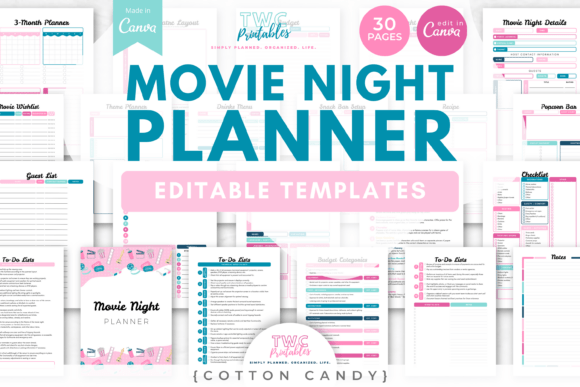
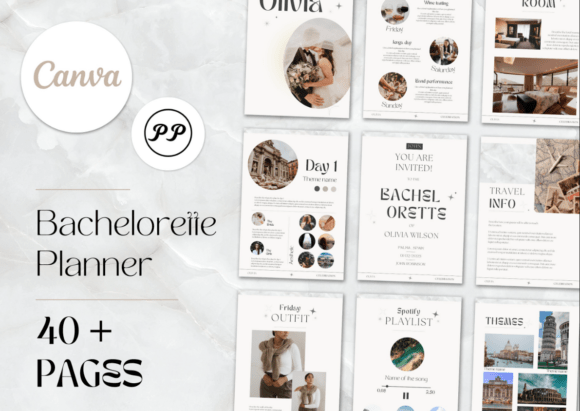
This isn't a generic checklist you'd find in a forgotten corner of the internet. The bachelorette planner template is designed with a modern, clean aesthetic that actually feels celebratory without crossing into kitschy territory. Think soft color palettes, elegant typography, and enough white space to let every detail breathe. The visual style balances playful energy with sophistication—because bachelorette parties have evolved well beyond the novelty-tiara era.
What's inside covers every angle you'd need to think through. The invitation page sets the tone from the start, giving guests a preview of what's to come. From there, the team section helps you assign roles so no single person carries the entire planning burden. The guest list keeps track of RSVPs, dietary restrictions, and contact details in one organized place. Then come the sections that really matter when the weekend arrives: the itinerary, the place, what to do, the outfit, and even a playlist and themes page to tie everything together visually and atmospherically.
There's also a social media planner built in, which acknowledges a reality of modern celebrations—people want to capture and share moments. Having a plan for coordinated posts, hashtags, or photo ops means the memories get documented without anyone fumbling through their phone mid-toast.
How to Use It Without Overcomplicating Things
The process is intentionally straightforward. After purchase, you receive a PDF containing a direct link to the template on Canva. One click takes you to the master file, where you save a copy to your own Canva account. From there, everything is editable—text, colors, images, layout elements. You don't need a design background. Canva's drag-and-drop interface makes customization accessible whether you're a seasoned graphic designer or someone who typically avoids anything more complex than a Word document.
The key step people sometimes skip is saving that copy before diving into edits. The master template stays intact for other users, so working from your own version ensures you won't accidentally lose your changes or interfere with someone else's access. Once you've personalized every section to match the bride's personality and the group's plans, you download the finished file—ready to share digitally or print.
A free Canva account handles everything you need here. No premium subscription required, no hidden software to install. The template works within Canva's standard tools, which means fonts, elements, and export options are all available without additional cost.
Where This Template Works Best
The practical applications go beyond just "planning a party." This bachelorette planner template functions as a design asset that event planners, wedding coordinators, and even small business owners in the bridal industry can adapt for their own use. The clean layout and professional finish make it suitable for both personal projects and commercial contexts—think bridal shops offering planning services, or content creators building a wedding-focused brand identity on social media.
For designers and marketers, the template demonstrates solid principles of visual hierarchy and modern typography. The typeface choices—likely a blend of sans serif font for readability and perhaps a script font or handwritten font accent for personality—show how font pairing can establish mood without sacrificing clarity. It's a practical case study in how premium font selections influence brand perception, even in something as specific as party planning materials.
The editorial design approach here also makes it a useful reference for anyone working on packaging design, web design, or social media graphics that need to feel polished yet approachable. The balance between structured information and decorative elements mirrors what you'd see in high-quality creative font applications across digital and print projects.
Getting the Most Out of Every Section
Start with the guest list and team assignments. These foundational pages prevent the most common planning headaches—miscommunication about who's handling what, or last-minute scrambles to confirm attendance. Once those are solid, the itinerary becomes much easier to build because you already know your headcount and your point people.
The outfit and theme sections are where personality really comes through. Encourage the group to coordinate without being overly prescriptive. A color scheme or style direction gives enough structure for cohesive photos while letting everyone express their own taste. The playlist page works similarly—curate a few must-have tracks and let the bride's closest friends fill in the rest.
When it comes to the social media planner, think beyond just posting. Consider creating a shared hashtag in advance, designating specific moments for group shots, and maybe even planning a few surprise elements that make for genuinely engaging content rather than staged photos that all look the same.
The beauty of working with a well-structured bachelorette planner template is that it removes the guesswork without removing the joy. You're not following a script—you're using a thoughtfully designed framework that handles the logistics so you can focus on celebrating. Whether you're organizing a weekend getaway, a night out, or a cozy gathering at home, having everything laid out in one cohesive document keeps the energy where it belongs: on the bride and the people who love her.