Faux Embroidery Canva Frame Letters: A Textured Design Revolution
There's something undeniably charming about the look of embroidery. It suggests care, craftsmanship, and a personal touch that digital designs often struggle to replicate. That textured, slightly imperfect, and tactile quality can instantly warm up a brand or project. The Faux Embroidery Canva Frame Letters_33 template brings that cozy, handmade aesthetic directly into your Canva workspace, offering a unique design asset for creators who want to blend digital convenience with analog charm.
What Exactly Is This Creative Font Template?
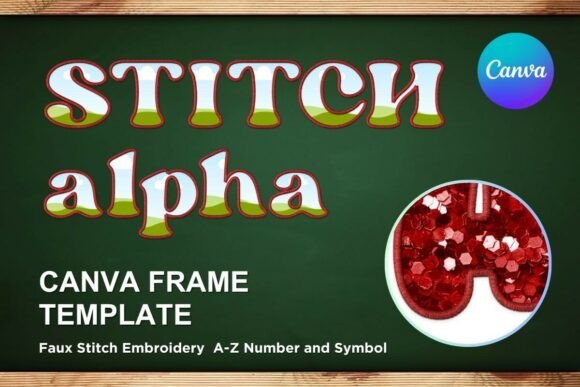
First, let's clarify what you're getting. This is not a traditional font file like an OTF or TTF. The Faux Embroidery Canva Frame Letters_33 is a digital PDF file containing a link to a custom-made, editable Canva template. Inside Canva, you'll find a full set of letter frames designed to mimic the look of stitched embroidery. Each letter is a transparent "frame" or container. You simply drag and drop your own background textures, colors, or patterns into the letter shapes, and the faux stitch effect is applied automatically. The result is a set of letters that look like they've been lovingly stitched onto your chosen fabric.
The visual personality of this style is warm, rustic, playful, and authentic. It carries a folk-art sensibility that feels both nostalgic and contemporary. The stitch details provide excellent texture and depth, making the letters pop off the page or screen. This isn't a sleek, minimalist sans serif font; it's a display font with a distinct character, meant for headlines, logos, and standout text where personality is key.
Where This Textured Typeface Truly Shines
The applications for the Faux Embroidery Canva Frame Letters_33 are surprisingly diverse. Its strength lies in projects that benefit from a human, artisanal feel. Consider it for logo design for craft businesses, bakeries, boutique shops, or family-oriented brands. It's perfect for creating social media graphics that need to stop the scroll with a unique, tactile look—think Instagram story announcements, Pinterest pins, or Facebook ads for handmade goods.
In packaging design, this style can elevate a product's perceived value, suggesting it's made with care. It works wonderfully for editorial design in cookbooks, craft magazines, or lifestyle blogs where a personal touch is part of the brand identity. For personal projects like wedding invitations, baby shower decor, or personalized gifts, it adds a layer of heartfelt charm that generic fonts can't match. Even web design elements like hero banners or section headers can benefit from its unique texture, provided it's used strategically to avoid overwhelming a clean layout.
Making It Work for Your Brand and Projects
Choosing a font—or in this case, a font template—is a strategic decision. The Faux Embroidery Canva Frame Letters_33 isn't a universal solution. It's a specialist tool. Before using it, evaluate your project's needs. Does your brand identity lean towards the handmade, rustic, cozy, or playful? If yes, this is a strong contender. If your brand is ultra-modern, corporate, or tech-focused, this style might create a disconnect.
A critical step is font pairing. Because this is a highly textured and decorative display font, it should be paired with a simple, clean companion for body text. A neutral sans serif font or a very clean serif font will provide excellent contrast and ensure readability. Never use the faux embroidery style for long paragraphs of text; its intricate details will become a visual mess at small sizes. It's designed for impact, not for reading ease.
Practical usage is straightforward thanks to its Canva-based nature. The template is built for easy drag-and-drop editing. You can resize the letters up or down to fit your needs, whether for a tiny social media icon or a large poster. The transparent layer makes it incredibly easy to integrate into existing designs or use with vinyl sublimation projects. Since it's a template, you maintain full creative control over the final color and pattern fill, making each creation uniquely yours.
From Concept to Final Design: Practical Tips
When you're ready to implement the Faux Embroidery Canva Frame Letters_33, start by considering your background. A solid color that contrasts with the stitch effect works well, but you can also experiment with subtle fabric textures or patterns for an even more realistic embroidered look. Test your letter designs on different mockups to see how they translate to digital and print contexts.
Remember, this is a creative font asset for specific use cases. It's not meant to replace your primary brand typeface for all communications. Instead, think of it as a special occasion typeface—use it for hero images, product launches, seasonal promotions, or signature elements that need that extra dose of personality. By using it judiciously, you maintain its impact and keep your overall brand identity consistent and professional.
Ultimately, the Faux Embroidery Canva Frame Letters_33 template offers a practical bridge between digital design and the beloved aesthetic of handcraft. It provides a valuable tool for designers, entrepreneurs, and hobbyists looking to inject warmth and texture into their work without the complexity of advanced design software. It’s about bringing that cozy, stitched feeling into the digital space, one editable letter at a time.